Line Pack Formulas
The following formulas are used for the Line Pack calculation for each pipeline content type.
- Natural Gas Volume (Estimated)
- Supercritical CO2 Mass (Estimated)
- Petroleum Liquids Volume (Estimated)
- Formula Options
Natural Gas Volume (Estimated)
The following formula is used to calculate the estimated line pack volume for natural gas.
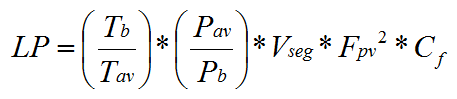
The following variables are used in this formula:
| Variable | Description |
|---|---|
|
LP |
Calculated natural gas volume (in MCF) in a pipeline segment; the line pack. |
|
Tb |
Base temperature (in degrees Rankine) for line pack. The base temperature is specified as a system input (not per pack segment), but is user-configurable. The default value is 60° F, or 519.67° Rankine. |
|
Tav |
Average flowing temperature (in degrees Rankine) in the pipeline segment. See Average Temperature below. |
|
Pav |
Average pressure (in psia) in the pipeline segment. See Average Pressure below. |
|
Pb |
Base pressure (in psia) for line pack. The base pressure is specified as a system input (not per pack segment), but is user-configurable. The default value is 14.73 PSIA. |
|
Vseg |
Volume (in MCF) of the pipeline segment based either on the segment’s configured length and diameter or a user-configured volume. See Pipe Volume below. |
|
Fpv |
Supercompressibility factor for the pipeline segment. The supercompressibility factor is user-configurable for each pipeline segment. See Supercompressibility Factor below. |
|
Cf |
Volume correction (conversion) factor. The correction factor is user-configurable for each pipeline segment. |
Supercritical CO2 Mass (Estimated)
The following formula is used to calculate the estimated line pack mass for supercritical CO2.
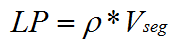
The following variables are used in this formula:
| Variable | Description |
|---|---|
|
LP |
Calculated supercritical CO2 mass (in pounds) in a pipeline segment; the Line Pack mass. |
|
ρ |
Measured Density or Calculated Density (in pounds per cubic foot). See the Overview for more information about Measured Density and Calculated Density. |
|
Vseg |
Volume (in cubic feet) of the pipeline segment based either on the segment’s configured length and diameter or a user-configured volume. See Pipe Volume below. |
Petroleum Liquids Volume (Estimated)
See the Petroleum Liquids Formula for more information on the formulas used to calculate the estimated line pack volume for petroleum liquids.

Formula Options
The following sections describe the various calculation options available. Formula options are configured on the Calculations page.
Average Temperature
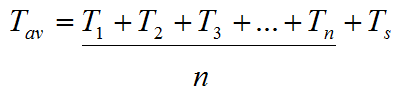
There are two options available when calculating average temperature: Arithmetic mean and Weighted average. See Average temperature formula for more information.
Arithmetic mean
For Arithmetic mean, specify the maximum number of temperature inputs that will be used in the arithmetic mean Average Temperature calculation. This setting configures the number of temperature inputs allowed (n), in addition to the Temperature: 1 and Temperature: 2. Up to 20 inputs per pipeline segment are allowed.
Weighted average
For Weighted average, the formula uses two temperature inputs: Inlet Temperature and Outlet Temperature. This is the default option.
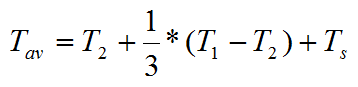
The following variables are used in these formulas:
| Variable | Description |
|---|---|
|
Tav |
Average flowing temperature (in degrees Rankine) in the pipeline segment. |
|
T1 |
Temperature input 1 (in degrees Fahrenheit) at the inlet (upstream) end of the pipeline segment. |
|
T2 |
Temperature input 2 (in degrees Fahrenheit) at the outlet (downstream) end of the pipeline segment. |
|
Tn |
Up to 20 temperature inputs (in degrees Fahrenheit) for a pipeline segment. |
|
Ts |
Temperature conversion factor (convert to Rankine). |
Average Pressure
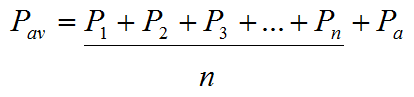
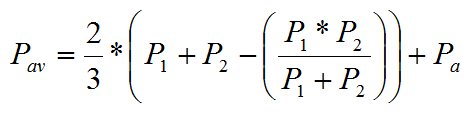
There are three options available when calculating average pressure: Arithmetic mean, Two-thirds rule, and Complex arithmetic mean. See Average pressure formula for more information.
Arithmetic Mean
For Arithmetic mean, specify the maximum number of pressure inputs that will be used in the arithmetic mean Average Pressure calculation. This setting configures the number of pressure inputs allowed (n), in addition to the Pressure: 1 and Pressure: 2. Up to 20 inputs per pipeline segment are allowed.
Two-Thirds Rule
For the Two-thirds rule, the formula uses two pressure inputs: Inlet Pressure and Outlet Pressure. This is the default option.
Complex Arithmetic Mean
For Complex arithmetic mean, specify the maximum additional pressure inputs that will be used in the complex arithmetic mean Average Pressure calculation. The formula for this average requires Inlet Pressure and Outlet Pressure, in addition to multiple pressure values at different points on the pipeline segment. This setting configures the number of pressure inputs allowed (n), in addition to the Pressure: 1 and Pressure: 2. Up to 20 inputs per pipeline segment are allowed.
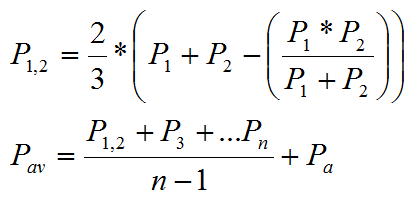
The following variables are used in these formulas:
| Variable | Description |
|---|---|
|
Pav |
Average pressure (in psia) in the pipeline segment. |
|
P1 |
Static gauge pressure input 1 (in psig) at the inlet (upstream) end of the pipeline segment. |
|
P2 |
Static gauge pressure input 2 (in psig) at the outlet (downstream) end of the pipeline segment. |
|
P1,2 |
Weighted average of upstream and downstream pressure (in psig). |
|
Pn |
Up to 20 static gauge pressure inputs (in psig) for a pipeline segment. |
|
Pa |
Atmospheric pressure (in psi) based on elevation to adjust the static pressure, expressed in psi. |
Pipe Volume
Pipeline volume is calculated either on the segment or sub-segment’s configured length and diameter or a user-configured volume. Segment and sub-segment properties are configured on Line Pack page.
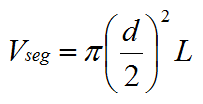
The following variables are used in this formula:
| Variable | Description |
|---|---|
|
Vseg |
Volume (in MCF) of the pipeline segment based either on the segment’s configured length and diameter or a user-configured volume. |
|
d |
The inside diameter of the pipeline segment. |
|
L |
The length of the pipeline segment. |
Supercompressibility Factor
Note: This option applies only to natural gas.
Specify the formula to use when calculating the supercompressibility factor. Supercompressibility calculations take into account how different gas compositions compress. These differences can be applied to corrected volumes using the following supercompressibility calculation options:
- AGA 8 — Gross Method 2
- NX 19 — Legacy
- NX 19
Note: The Last Segment Input: Methane UDC must be set if using the NX19 supercompressibility formula.
AGA 8 — Gross Method 2:
Implemented by the CygNet Measurement Calculation Engine (CygMeasCalc.dll) ©.
NX19:
Nx19 support is compliant with the NX19 Gravity/Carbon/Nitrogen (GCN) Method 1962, which includes two calculation options based on gravity:
- NX19 - Legacy — uses the NX19 GCN formula for gravities less than or equal to 0.75. Earlier Line Pack calculations used custom NX19 calculations without Methane as an input. This option is included for backward compatibility of Line Pack calculations.
- NX19 — uses the GCN formula for gravities greater than 0.75.
See Supercompressibility formula for more information.
Preferred Density Rollup
Note: This option applies only to CO2.
Specify the CO2 density value to use in the rollup if both values are available for a segment. Options include:
- Pack from measured density — a density sensor in the pipeline provides a measured density value
- Pack from calculated density — a density value is derived from a lookup table of calculated density values
See the Overview for more information about density sources. The rollup calculation method can be overridden at the pack segment or pack sub-segment level if required.
See Preferred (density) rollup formula for more information.
MAOP
Maximum Allowed Operating Pressure (MAOP) is an optional secondary value that is only calculated when the normal line pack calculation executes.
Specify the formula to use when calculating the Maximum Allowed Operating Pressure (MAOP). Options include:
- Not calculated
- Single input
- Same as average pressure
For Single input and Same as average pressure, specify how frequently to calculate (Calculate every number of seconds) the pack at the Maximum Allowed Operating Pressure (MAOP).
See MAOP formula for more information.
Mass Balance
See the Mass Balance Formula for more information on the formula used to calculate real-time mass imbalance in a pipeline segment.
Other Calculation Inputs
The following inputs need to be specified per pack segment for each pipeline content type. Input values are specified for a pack segment in a base input rule or a custom calculation rule, or in the global (default) inputs, if no such values are specified for a pack segment. See Base Inputs Rule, Custom Inputs Rule, Global Inputs.
| Natural Gas | Supercritical CO2 | Petroleum Liquids |
|---|---|---|
|
Atmospheric Pressure Volume Correction Factor Specific Gravity Carbon Dioxide Carbon Monoxide Nitrogen Hydrogen Average temperature inputs (see below) Average pressure inputs (see below) Supercompressibility Factor Energy Content MAOP inputs (see below) Base temperature Base pressure Contract hour See Natural Gas UDCs for definitions of these inputs. |
Atmospheric Pressure Average temperature inputs (see below) Average pressure inputs (see below) MAOP inputs (see below) Measured Inlet Density Measured Outlet Density Contract hour See Supercritical CO2 UDCs for definitions of these inputs. |
Average temperature inputs (see below) Average pressure inputs (see below) MAOP inputs (see below) Commodity Type (see note below) Alpha 60 Pressure Equilibrium Vapor Observed Density Observed Temperature Observed Pressure Standard temperature Standard pressure Contract hour See Petroleum Liquids UDCs for definitions of these inputs. |
Inputs NotesNote: Inputs depend on the calculation type selected on the Calculations page. Average temperature inputs Temperature: 1 — Temperature: n or Inlet Temperature and Outlet Temperature Average pressure inputs or Inlet Pressure and Outlet Pressure or Inlet Pressure, Outlet Pressure, and Pressure: 1 — Pressure: n MAOP inputs or or or Inlet MAOP, Outlet MAOP, and MAOP: 1 — MAOP: n Commodity Type 0: Unknown (Requires the "Alpha 60 thermal expansion factor" to be set) 1: Crude 2: Refined unspecified 3: Refined Fuel Oils 4: Refined Jet Fuels 5: Refined Transition 6: Refined Gasolines 7: Lubricating Oil 8: Special Apps |
||

More:


